
In 2003, the University’s IT department decided to modernize the planning process of weekly schedules for the upcoming semester, since every course of study performed this manually using different approaches, but always involving one large sheet of construction paper, rulers and colored pens for the task. Since the IT guys already had every room, lecture hall and conference room in the database, as well as the lecturers and the subjects, all that was left was to “just” design the process of actual planning. As simple as possible, of course.
This task was given to us, the Information Design students, as an integrated User Centered Design tutorial. Our lecturer, Dr. Baumann, chose the Problem Based Learning approach for this assignment, so we had to dig deeper to understand in advance what challenges might emerge in using this UI and the system in general.
At first I realized that the process revolved around people, space and time.
The last two can be tuned; conference rooms can be customized and upgraded with mobile equipment such as laptops, projectors, whiteboards etc. If one was to prioritize the lecturers, time-slots would be created, making the planning more flexible just by arranging the suitable dates and times with the visiting lecturers, making them high priority.
So, the first step – sort out the visiting lecturers and contact them regarding the dates and times. These get inserted into the timetable first. Second, for the faculty that teaches in other degree programs, coordinate weekdays with other courses of study and insert these into the timetable. Last, fill the blanks with the remaining subjects, setting up the locations with extra equipment if needed.
The UI would consist of a calendar on the left-hand side and drop-down menus next to it. After choosing the week, the user would start appointing time blocks and locations for each of the lecturer/subject, color-coded in red (“high priority”), green (“shared lecturer”) and black (“home lecturer”). The button named “Extras” brings up a dialog box with check boxes, marking the additional equipment to be “ordered” and set up through the Facility Management Department before the lecture begins.
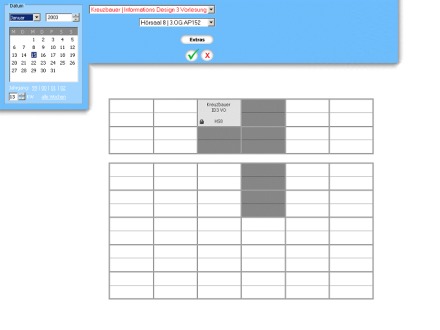
When lecturer/subject is selected, a block is dropped onto the first available position of the arranged date/time span. The surrounding blocks are low-lighted displaying other possible choices. These fields are also low-lighted in editing mode when a block is clicked and the mouse button is held down.
After confirming the choice though the green “OK” button, this lecturer/subject disappears from the list and the next one can be selected. It would reappear as unassigned only if the block was to be deleted in editing mode.
So, theoretically, after couple of minutes of Sokoban action, the planning would be over 🙂
